
Sunday Family Reset: A Simple Home Command Center System for Busy Parents
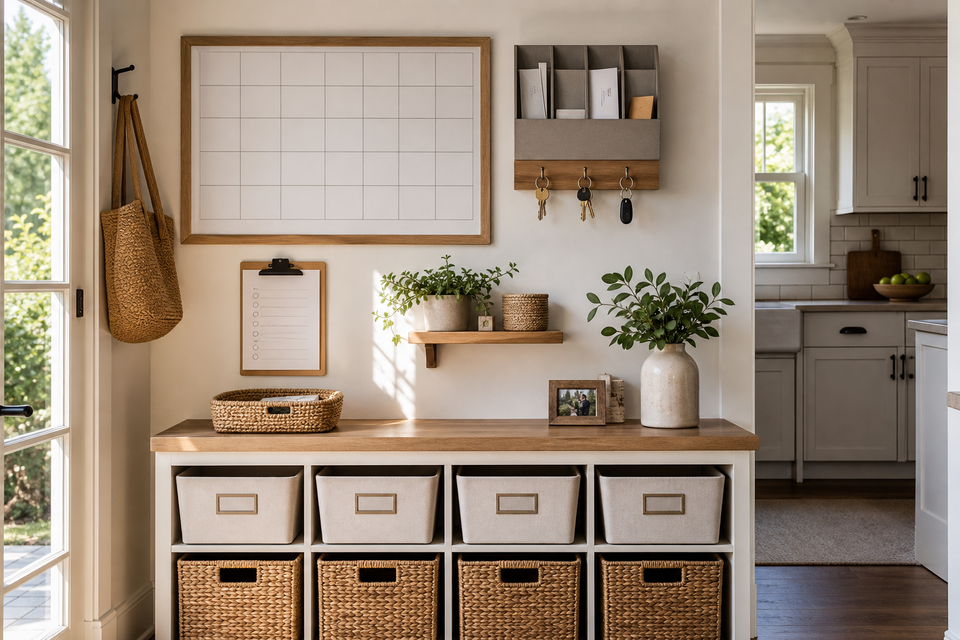
What a Sunday family reset actually is
A Sunday reset is not a moral test, a full-house cleaning day, or a three-hour productivity ritual. For families, it should answer five questions before Monday morning:
- What is happening this week?
- What are we eating?
- What papers, forms, bills, or school messages need action?
- What needs to leave the house tomorrow?
- What is the one thing that would make this week less chaotic?
That is it.
The reason this works is simple: families run better when expectations are visible. The American Academy of Pediatrics notes that family routines help organize life and give children a sense of predictability. The CDC frames structure around consistency, predictability, and follow-through. A Sunday reset turns those ideas into something practical: one weekly checkpoint everyone can see.
The 5-zone home command center
A home command center does not need to look like a Pinterest wall. It can be a whiteboard, a fridge corner, a hallway shelf, a shared Google Calendar, or one clipboard near the kitchen. The point is not decoration. The point is decision storage.
Use five zones.
Zone 1: The weekly calendar
This is the top layer: appointments, school events, work travel, sports, lessons, due dates, trash day, library day, and anything that changes the normal rhythm.
Keep it weekly, not monthly. Monthly calendars are useful, but families usually break down during the next five days, not the next five weeks.
During the reset, ask:
- Who needs to be where?
- What requires a ride?
- What requires money, forms, snacks, gear, or special clothes?
- Which night is overloaded?
- Which night needs the easiest dinner?
If your household already uses shared digital tools, pair this with the ideas in Free AI Helpers for Family Admin. AI should not run the family, but it can turn scattered reminders into a cleaner weekly list.
Zone 2: The meal plan and grocery list
Meal planning does not have to mean seven perfect dinners. For most families, the better target is four planned dinners, one leftovers night, one flexible pantry meal, and one easy backup.
A good Sunday meal check includes:
- Look at the calendar first.
- Assign the easiest meals to the busiest nights.
- Check the fridge before writing the grocery list.
- Pick one protein or base that can stretch into two meals.
- Prep only the thing that will actually save you on Tuesday.
If food spending is the pressure point, connect this reset to the Grocery Budget Reset instead of treating meals as a separate chore. The same weekly check can lower grocery waste, reduce last-minute takeout, and make weeknights feel less improvised.
Zone 3: The paper inbox
Every family needs one place where papers land before they become a problem.
Use one tray, folder, basket, wall pocket, or clipboard labeled something obvious like “Needs Action.” Do not create six categories at first. Complicated paper systems fail because no one wants to file a permission slip at 7:42 p.m.
On Sunday, sort the paper inbox into four decisions:
| Paper type | Sunday action |
|---|---|
| Permission slips, school forms, medical forms | Sign, scan/photo if needed, put in backpack |
| Bills or household admin | Pay, schedule, or put on calendar |
| Event flyers and invitations | Add date, RSVP, recycle flyer |
| Art, worksheets, random paper | Keep one, photo one, recycle the rest |
The rule is simple: paper should leave the command center with either a date, an owner, or a trash/recycle decision.
Zone 4: The launch pad
The launch pad is where Monday morning items wait: backpacks, work bags, sports gear, library books, returns, lunch boxes, jackets, shoes, keys, and anything that needs to physically leave the home.
This can be a mudroom, entry bench, hallway hook, laundry basket, or one chair near the door. It does not need to be beautiful. It needs to be boring and reliable.
Sunday launch-pad check:
- Backpacks emptied and repacked
- Devices charged
- Lunch boxes washed
- Water bottles found
- Shoes matched
- Forms placed in the right bag
- Sports or activity gear staged
- Returns or errands placed by the door
If something routinely gets forgotten, it belongs in the launch pad, not in your memory.
Zone 5: The reset checklist
The checklist is the part that keeps the system from turning into vague “we should get organized” energy.
Keep it short enough to finish even when Sunday is messy. A family that can complete a 20-minute reset every week is better off than a family that plans a perfect two-hour reset and quits after week two.
Keep the reset visible, short, and repeatable.
The 45-minute Sunday family reset checklist
Use this version when you have a normal Sunday window and want a real reset without making the evening feel like work.
First 10 minutes: calendar sweep
- Review the week together.
- Mark late nights, early mornings, appointments, and deadlines.
- Choose the hardest night of the week.
- Decide what gets simplified on that night.
Next 10 minutes: food plan
- Pick four dinners.
- Choose one leftovers or freezer night.
- Check the fridge and pantry.
- Start a grocery list.
- Prep one small thing: washed fruit, chopped vegetables, cooked rice, lunch snacks, or thawed protein.
Next 10 minutes: paper and admin
- Empty the paper inbox.
- Sign forms.
- Add event dates to the calendar.
- Pay or schedule any urgent household bill.
- Recycle what no one needs.
Next 10 minutes: launch pad
- Pack bags.
- Stage sports/activity gear.
- Find shoes, jackets, water bottles, and lunch boxes.
- Put returns or errands near the door.
- Charge devices.
Final 5 minutes: one family priority
Ask one question: “What would make this week feel easier?”
Pick one answer only. Not five. One.
Examples:
- Move bedtime 15 minutes earlier on two school nights.
- Make Monday dinner leftovers.
- Put the dentist form in the backpack now.
- Cancel one optional errand.
- Prep breakfast for the first two mornings.
This final question is where the reset becomes a family system instead of a cleaning list.
Interactive Sunday family reset planner
Use this quick planner during the reset. If the interactive version does not load, the same steps are listed directly below it.
Sunday Reset Planner
Check what you can realistically handle today. The goal is a calmer Monday, not a perfect house.
No-JS fallback: write down the hardest night this week, one easy dinner for that night, one must-not-forget item, and the five reset tasks you can actually finish.
The small-home version
If you do not have wall space, skip the wall command center and make a portable one.
Use:
- One clipboard for the weekly checklist
- One folder for papers that need action
- One basket near the door for launch-pad items
- One shared digital calendar
- One notes app grocery list
A portable command center is often better for apartments, small houses, rental homes, and families who do not want visual clutter. The system matters more than the wall.
What kids can own
Children do better with routines when the steps are visible and repeatable. Head Start describes predictable schedules and step-by-step routines as a way to help children know what is happening now, what comes next, and how to participate.
Give kids ownership based on age and ability:
| Age/stage | Reset job ideas |
|---|---|
| Preschool | Put shoes by the door, choose one snack, place artwork in a keep/recycle pile |
| Early elementary | Empty backpack, put forms in the inbox, choose a lunch item, refill water bottle |
| Older kids | Add activities to calendar, pack activity gear, own one laundry step, help choose dinner |
| Teens | Update shared calendar, manage school deadlines, prep clothes/gear, help plan rides |
The goal is not unpaid household labor. The goal is shared visibility. Everyone should know what Monday needs before Monday arrives.
What to skip
Skip anything that makes the reset too heavy to repeat.
Do not deep clean the whole house unless you already have energy for it. Do not reorganize the pantry every Sunday. Do not make a seven-night meal plan if your real week changes constantly. Do not create a command center with twelve bins, five labels, and a rule no one else understands.
The best family systems are boring. They work because they are obvious.
A realistic 20-minute Sunday reset
On hard weekends, do this instead:
- Review the next three days.
- Pick two dinners.
- Empty backpacks and sign urgent forms.
- Put Monday items by the door.
- Choose the one thing that would make tomorrow easier.
That is enough. A partial reset still protects Monday morning.
How this fits into a smarter household system
The Sunday reset is a weekly anchor. It connects the rest of the household systems: food, money, school, errands, routines, and clutter.
If you are building those systems one at a time, start with this reset, then layer in the bigger guides from Start Here — Best Money-Saving Guides. A family command center is not just about being tidy. It is about making the important stuff visible early enough to do something about it.
FAQ
What should be in a family command center?
A family command center should include a weekly calendar, a meal plan or grocery list, a paper inbox, a launch pad for items leaving the house, and a short reset checklist. Add hooks, bins, or shelves only if they support those jobs.
How long should a Sunday family reset take?
Aim for 20 to 45 minutes. If it takes longer than an hour every week, the list is probably too big. The reset should prevent chaos, not become another exhausting Sunday obligation.
Is a digital calendar enough?
A digital calendar can handle the schedule, but most families also need a physical place for papers and items that leave the house. Use digital tools for dates and reminders; use the launch pad for backpacks, forms, shoes, keys, sports gear, and returns.
What if we do not have space for a wall command center?
Use a portable command center: one clipboard, one paper folder, one basket by the door, and one shared calendar. Small-space systems can work better because they force you to keep only what matters.
Should kids help with the Sunday reset?
Yes, but keep their jobs concrete. “Get ready for the week” is too vague. “Put your library book in your backpack” or “choose two lunch snacks” is clear. Kids can build independence when the routine is visible, repeatable, and matched to their age.
What is the biggest mistake with a Sunday reset?
Trying to do too much. A Sunday reset should make the week lighter. If the checklist creates dread, cut it in half. Keep the calendar, meals, papers, launch pad, and one family priority. Everything else is optional.
Start this Sunday
Pick one version: 20 minutes or 45 minutes. Put the checklist somewhere visible. Review the calendar before the meal plan. Stage Monday before bedtime. Then stop.
A calmer week usually starts with fewer decisions, not more ambition.